Published October 8, 2026 · Last updated October 8, 2026 · Published by AnyTeam
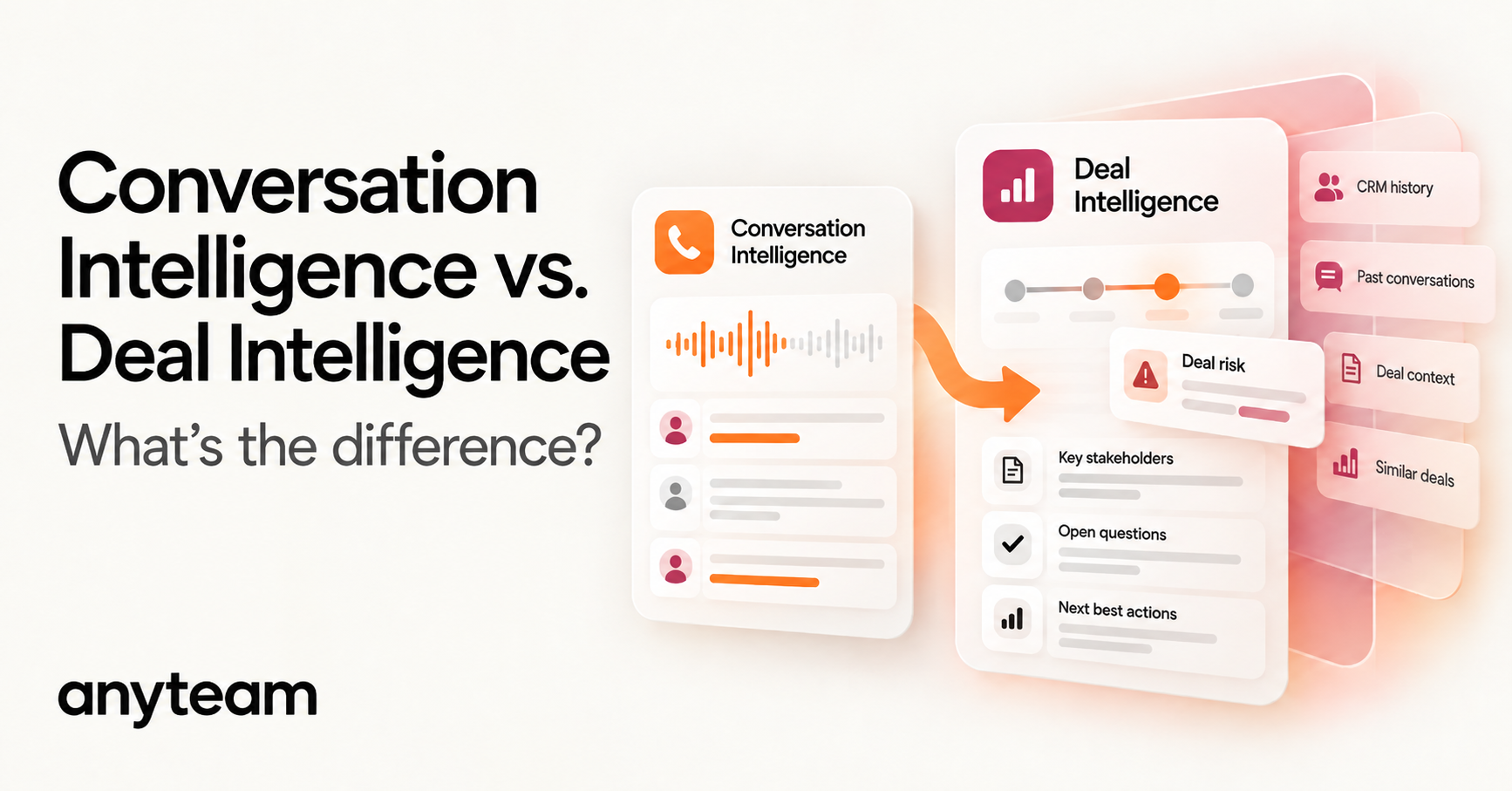
Conversation intelligence analyzes customer interactions. Deal intelligence analyzes the opportunity those interactions belong to. Conversation intelligence reads a call or meeting to work out what was said and what it suggests. Deal intelligence reads every conversation, email, stakeholder, commitment, and change across the life of a deal to judge whether the opportunity is healthy and what needs attention next.
The two now overlap heavily. Many conversation-intelligence products flag deal risk, update CRM fields, and recommend next steps, so a feature checklist no longer tells them apart. The more durable difference is what each system is built to understand: a single interaction, or the state of an opportunity over time.
Key takeaways
- Different starting units. Conversation intelligence starts from the interaction, deal intelligence from the opportunity over time, and revenue intelligence from the pipeline and forecast.
- Features no longer separate them. Risk flags, CRM updates, and next-best actions appear in all three, so ask what body of context a system is built to understand.
- History changes meaning. Deal intelligence tells you whether a signal is new, already addressed, recurring, contradicted, or getting worse.
- Deal memory is not organizational memory. Deal intelligence explains this opportunity; organizational memory adds what your company has learned from opportunities like it.
- The output should be an action that is specific and explained, with the seller approving anything that reaches the buyer or changes the forecast.
Vendors use these category names differently, and none has a standard definition. The context model in this guide is AnyTeam’s framework for comparing them. For the wider category, see the complete guide to AI sales productivity; for specific products, see Best AI Sales Productivity Tools for B2B Teams.
Jump to: What is conversation intelligence? · What is deal intelligence? · The difference · Deal vs. revenue intelligence · Do they overlap? · What deal intelligence adds · Is conversation intelligence enough? · What data AI needs · Organizational memory · From conversations to action · Do you need both? · How to evaluate · Where AnyTeam fits · FAQ
What is conversation intelligence?
Conversation intelligence is software that captures customer conversations, such as sales calls and meetings, and analyzes them to surface what matters: objections, competitor mentions, pricing discussion, commitments, next steps, and patterns across many calls. Its primary object is the interaction.
Transcription is only the first step. The value is in the analysis layer that decides which parts of a conversation matter and what can be done with them. Teams typically use conversation intelligence to coach reps, review calls, spot trends across hundreds of conversations, and turn each call into notes and follow-up items.
Modern conversation-intelligence platforms go further, and many now produce opportunity insights, flag deal risks, update CRM fields, and recommend next steps (more on that overlap below). The center of gravity is still the conversation: what was said, by whom, and how it went.
What is deal intelligence?
Deal intelligence is software that analyzes a single sales opportunity across all of its interactions and systems to assess its health, identify risks, and recommend what to do next. Its primary object is the opportunity over time.
A deal-intelligence view combines conversation content with everything else that describes the deal: CRM stage and its history, close-date and amount changes, email activity and silence, which stakeholders have engaged and which have not, commitments made on both sides, and account-level changes such as a new executive. Conversations are one input, often the richest one, but they are not the whole picture.
The question deal intelligence answers is broader than “what happened on this call?” It asks what is happening to this deal, why, and what requires attention.
What is the difference between conversation intelligence and deal intelligence?
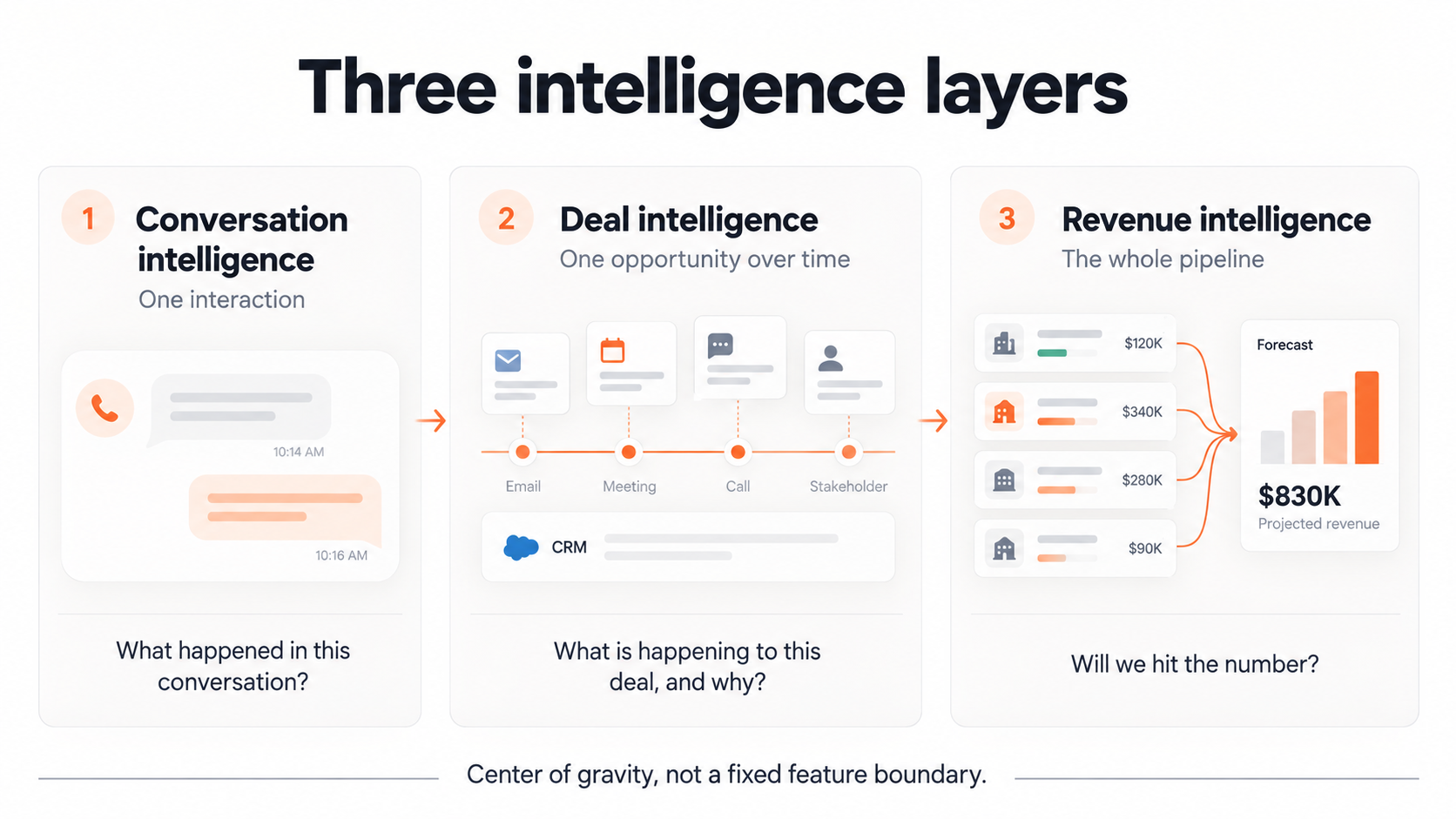
Conversation intelligence asks what happened in an interaction. Deal intelligence asks what is happening to an opportunity, using every interaction and system that describes it. The difference shows up in five places:
- Unit of analysis: a conversation vs. an opportunity.
- Context depth: what was said in captured conversations vs. conversations plus CRM history, email, attendance, stakeholders, commitments, and account changes.
- Time horizon: one interaction (or trends across many) vs. the life of the deal.
- System memory: a searchable library of conversations vs. a persistent deal state that each new signal updates.
- Decision supported: how to run and coach conversations vs. where a deal stands and what to do about it.
Revenue intelligence adds a third level above both: the pipeline, the team, and the forecast.
Conversation, deal, and revenue intelligence compared
| Conversation intelligence | Deal intelligence | Revenue intelligence | |
|---|---|---|---|
| Primary unit of analysis | One interaction (a call or meeting) | One opportunity across time | The portfolio: pipeline, team, quarter |
| Core question | What happened in this conversation? | What is happening to this deal, why, and what needs attention? | What is happening across the revenue organization, and will we hit the number? |
| Primary context | What was said in captured conversations | Conversations plus CRM history, email, attendance, stakeholders, commitments, and account changes | Deal, activity, and CRM data aggregated across all opportunities |
| Time horizon | The interaction, and trends across many interactions | The life of the opportunity | The quarter and the forecast period |
| What it remembers | A searchable library of conversations | The evolving state of each deal | Pipeline snapshots and forecast history |
| Typical outputs | Summaries, action items, call scores, coaching insights, topic trends | Deal health, risk explanations, missing stakeholders, recommended next actions | Forecasts, pipeline coverage, team-level risk views |
| Primary user | Reps, frontline managers, enablement | The deal owner and their manager | Sales leaders, RevOps, finance |
| Strongest at | Accurate detail on what buyers said and how reps handled it | Reading each new signal against the deal’s history | Seeing patterns and exposure across many deals |
| What it may miss | What happens outside recorded conversations: silence, absent stakeholders, slipped dates, unkept promises | Pipeline-level patterns, and lessons from other deals unless it can draw on organizational memory | The specific reasons a particular deal is where it is |
Modern platforms increasingly overlap. This table describes each category’s center of gravity, not a permanent feature boundary.
What is the difference between deal intelligence and revenue intelligence?
Deal intelligence works on one opportunity at a time. Revenue intelligence works across the whole portfolio: pipeline coverage, forecast accuracy, team performance, and which parts of the business are at risk. A rep uses deal intelligence to decide what to do on a deal, while a CRO uses revenue intelligence to judge whether the quarter is on track and where to step in.
The two depend on each other. Revenue intelligence rolls deal-level judgments up into a number, so it inherits any error underneath. If a forecast weights deals by CRM probability, a $150,000 deal marked at 80% contributes $120,000 to it, whether or not the deal’s history supports 80%. Accurate deal-level understanding is what makes the portfolio view trustworthy.
What’s the difference between a sales meeting assistant and a deal intelligence platform?
A sales meeting assistant is organized around the meeting. It captures a call, writes notes and a summary, lists action items, and often logs the result to the CRM. A deal intelligence platform is organized around the opportunity and treats each meeting as one input to an ongoing picture of the deal. The useful test is what changes when a meeting ends: a meeting assistant adds a record of the meeting, while a deal intelligence system updates its understanding of the deal. AnyTeam’s comparison with Granola shows how a meeting-centric tool differs from a deal-centric system when a rep has to act on what was said.
Do conversation intelligence and deal intelligence overlap?
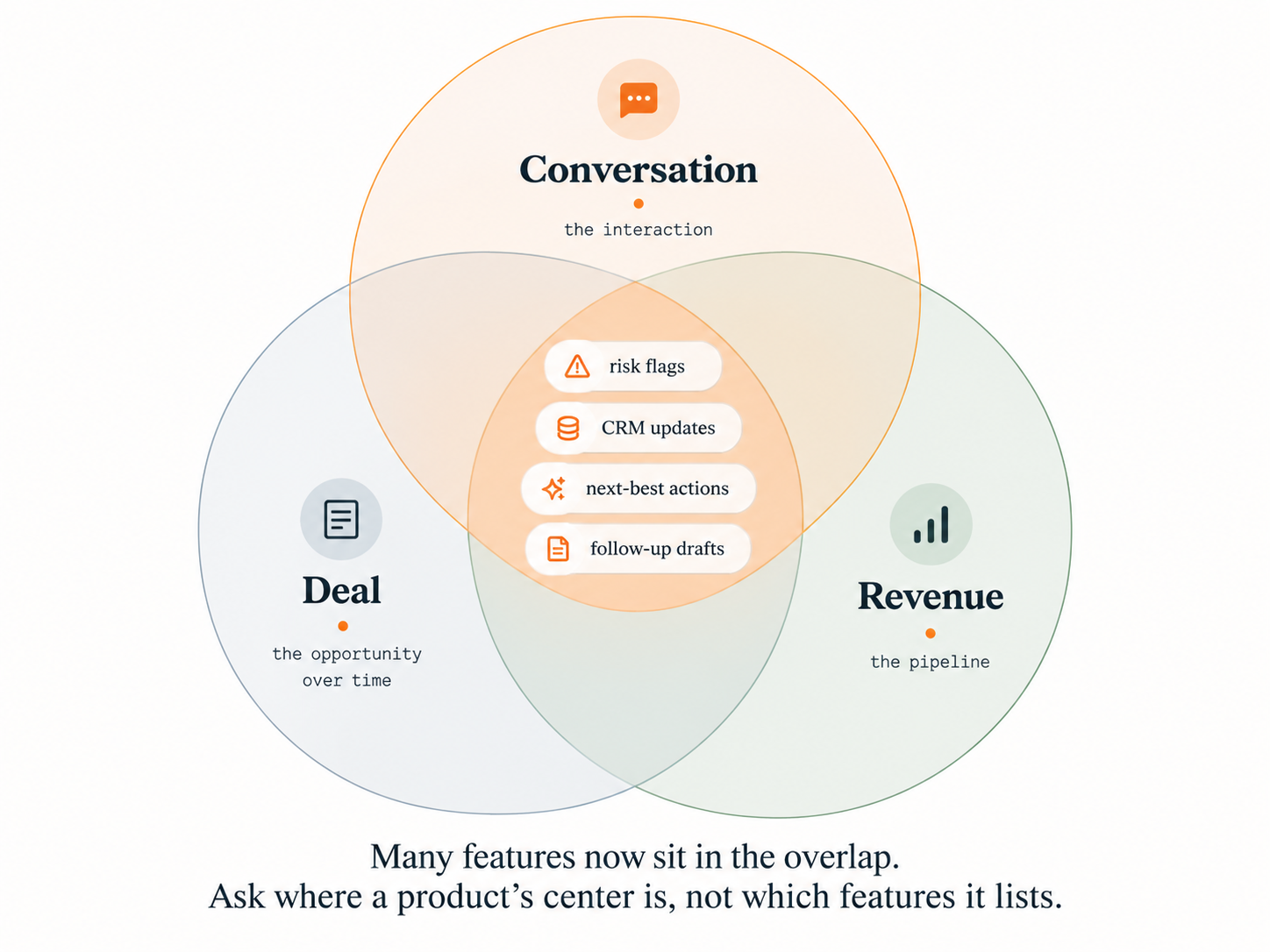
Yes, increasingly. Conversation-intelligence products now market opportunity insights, deal-risk alerts, CRM updates, and next-best actions, while deal-intelligence and revenue-intelligence products ingest call transcripts, email, and activity data. Most vendors span more than one category, so a product’s category label tells you less than it used to.
Current product documentation shows the convergence. Outreach documents a Deal Agent that turns meeting and conversation context into reviewable deal insights and opportunity-field recommendations. Salesforce’s Agentforce Sales documentation describes agents that analyze CRM-linked notes, emails, and recorded interactions to suggest opportunity-field updates and follow-up actions, depending on configuration. The vendor documentation we reviewed for our tools guide showed the same pattern: products known for conversation analysis also document deal monitoring, automatic CRM field updates, and forecasting.
Why a feature checklist no longer separates the categories
If you compare products by asking “Does it flag risk? Does it recommend a next step? Does it update the CRM?”, the answer is often yes in all three categories. Those questions describe outputs, and outputs have converged.
The question that still separates them is what body of context a system is built to understand and maintain. Two products can show the same “security risk” flag on the same deal. One reached it from a single call transcript. The other reached it from that call plus three earlier mentions, an unanswered email to the buyer’s security lead, and two close-date changes. The flags look identical, but only the second system can explain why the risk exists and what it means for the deal.
Category as center of gravity
Treat a category as a product’s center of gravity rather than a fixed set of features, and ask what the system is primarily trying to understand and improve: a conversation, an opportunity, or the pipeline. A conversation-first product that adds deal features is usually still strongest at conversations, and a deal-first product that ingests calls treats them as one input among several. Products change quickly, so judge the version you would actually buy.
What can deal intelligence tell you that conversation intelligence cannot?
Deal intelligence can tell you what a signal means in the context of the whole opportunity: whether it is new, already addressed, recurring, contradicted by something said earlier, or getting worse. It can also see signals that no single conversation contains, such as a stakeholder who has never attended, an email that went unanswered, a commitment that was missed, or a close date that keeps moving.
One deal makes the difference concrete.
The deal (illustrative): a $150,000 opportunity in the Negotiation stage, with a close date at the end of the month and an 80% probability in the CRM. On the latest call, the champion says: “We like the product, but security still needs to approve it.”
What the conversation shows
A good conversation-level read of that call is accurate. It identifies:
- a security review, raised as a potential blocker
- the security team, referenced as a stakeholder
- positive sentiment toward the product
- a follow-up required on security
Taken alone, this reads like a routine late-stage item: send the security documentation and keep the deal moving.
What the deal history shows
Read against the rest of the opportunity, the same sentence looks different:
- Security first came up three calls ago.
- The security package was sent after that call.
- The champion said at the time that security would not block the deal.
- The buyer’s security stakeholder has never attended a meeting or replied to an email.
- The champion’s replies have slowed.
- The close date has moved twice.
- The next step the buyer agreed to on the previous call was missed.
Same sentence, different meaning
With the history in view, “security still needs to approve it” is no longer a new follow-up item. It is a recurring blocker that the obvious fix (sending the security package) has already failed to resolve. It contradicts the champion’s earlier assurance, and it depends on a stakeholder nobody has reached. Together with a quieter champion, a missed next step, and two date changes, it suggests the deal is less healthy than the 80% in the CRM implies.
The conversation-level read was not wrong; it answered a different question. Conversation intelligence detects the signal, and deal memory tells you whether that signal is new, resolved, recurring, or getting worse. A conversation platform that also reads CRM history and email would catch part of this. What matters is whether the system holds the deal’s whole history together and reads each new statement against it.
Is conversation intelligence enough to understand whether a deal is healthy or at risk?
Not on its own. Conversation intelligence can tell you whether a call went well and flag risks that buyers say out loud. Deal health also depends on what happens between conversations (who never joined, which emails went unanswered, which dates moved, which commitments slipped) and on how each new signal compares with the deal’s history.
In the example, every conversation-level indicator looks fine, and the risk only appears alongside the missing stakeholder, the slipping dates, and the champion’s earlier assurance. Conversation intelligence is enough for coaching and call quality. Deal health needs an opportunity-level view, from a deal-intelligence product or a conversation platform that models the full deal.
What data does AI need to understand the full state of a B2B deal?
AI needs seven kinds of information to understand a deal’s full state. Conversation data covers the first well and the rest only in part:
- What was said: objections, competitor mentions, pricing discussion, and next steps from calls and meetings.
- What was written and done: email threads, response times, meeting attendance, shared documents, and periods of silence.
- Who is involved: the buying group, who has engaged, who has not, and whether the deal depends on a single contact.
- What changed: stage, amount, close date, and probability, including the history of those changes rather than only today’s values.
- What was promised: commitments made by the seller, the buyer, and the seller’s own team, and whether each was kept.
- What is happening at the account: leadership changes, funding, hiring, restructuring, and news.
- What the organization has learned: outcomes from comparable deals (covered in the next section).
Two kinds of signal matter most and come least from conversations. The first is absence: the stakeholder who never appears and the reply that never arrives. The second is change over time, which requires history rather than a snapshot. A CRM record that shows today’s close date cannot, on its own, tell you that the date has moved twice.
These signals are hard to bring together because they live in different systems. In Salesforce’s 2026 State of Sales survey of 4,050 sales professionals, 51% of sales leaders using AI said tech silos delay or limit their AI initiatives, and 46% of sales professionals using AI agents said data-quality issues hurt their sales. Both figures are self-reported, and Salesforce sells CRM and AI products. A deal view built mostly from CRM fields can only be as current and complete as those fields.
What does organizational memory add beyond deal history?
Deal memory holds everything that has happened in one opportunity. Organizational memory holds what your company has learned across many opportunities: which patterns came before a stall, which responses worked, and which did not. Deal intelligence explains this opportunity; organizational memory adds what your company has learned from opportunities like it.
Deal intelligence is usually described in terms of the current deal, which leaves the seller to supply precedent from personal experience. Organizational memory changes the questions a system can help answer.
Deal memory answers questions about this opportunity: Has security come up before in this deal? Was the package sent? Has the security stakeholder ever engaged? How many times has the close date moved?
Organizational memory answers questions about opportunities like it: In comparable deals, what usually happened when a security review started this late? What did the reps who got through it do differently? Which responses stalled? At what point did experienced reps reset the close date?
In the example, suppose your team’s history showed that late security reviews moved forward when the seller’s own security lead met the buyer’s security team directly, and stalled when reps kept resending documents. The recommendation would change again, from “follow up on security” to “get the two security teams on a call this week.” That history is illustrative. The point is that precedent from comparable deals can change both the interpretation and the action.
Organizational memory is not a transcript archive, a document repository, or one rep’s experience. Research on organizational memory describes it in terms of how organizations acquire, retain, and retrieve information (Walsh and Ungson, 1991). In selling, retrieval is the hard part: a lesson from last year’s deals helps only if it surfaces when a similar situation appears. Precedent is also not prediction, since two deals can look alike and still turn on different people, so the seller decides what applies. For how this kind of memory is built, see AnyTeam’s explainer on how organizational sales memory compounds.
How should AI turn sales conversations into deal-risk signals and next-best actions?
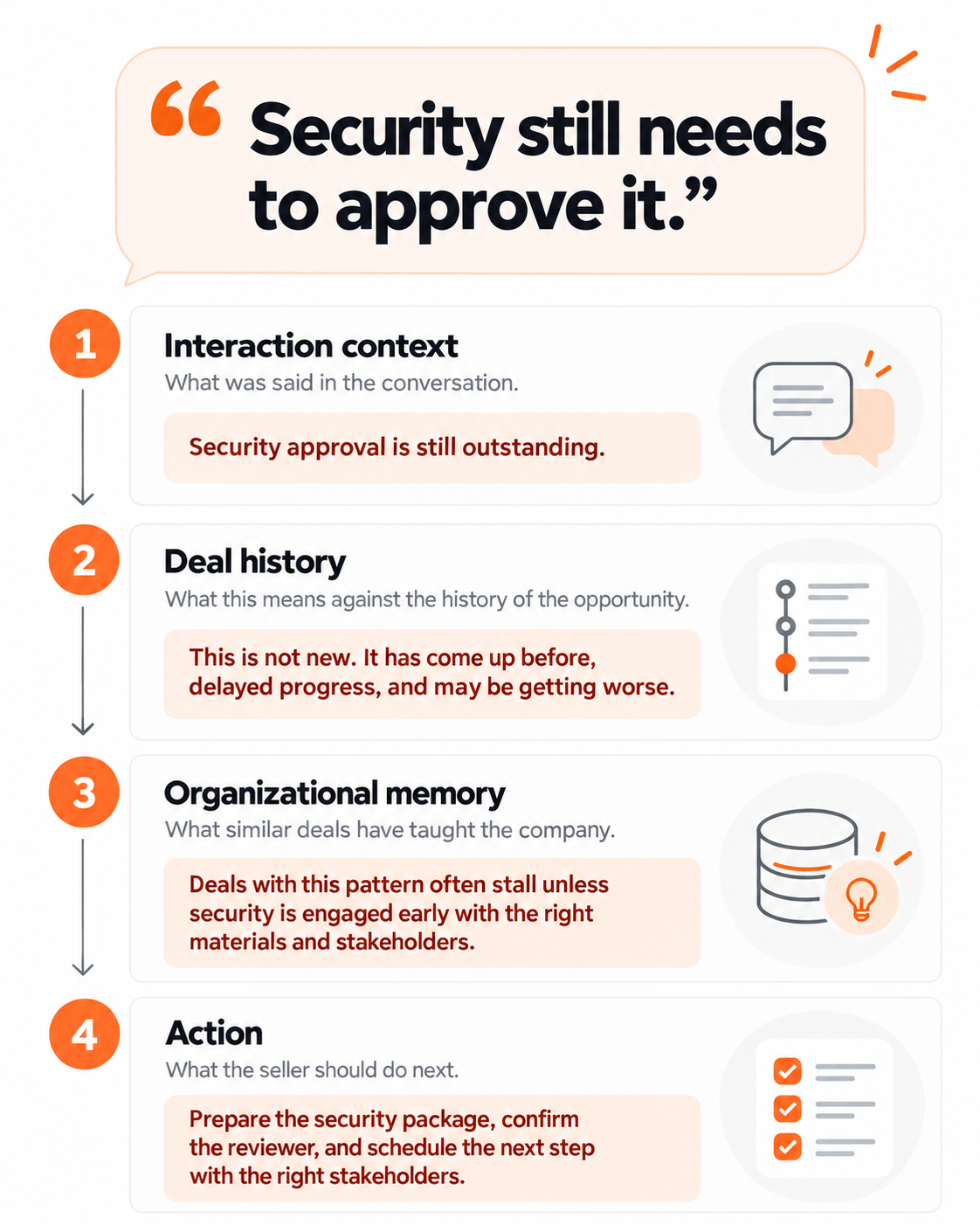
AI should move each conversation through four layers of context before it recommends anything: what happened in the interaction, what that means given the deal’s history, what the organization has learned from similar situations, and what should happen next. Skipping a layer is how a system ends up recommending the obvious step that has already failed.
The context model: one signal at four levels
| Layer | Question it answers | What the system needs | In the $150,000 deal |
|---|---|---|---|
| Interaction context | What happened in this conversation? | The captured conversation | Security approval raised as a possible blocker; follow-up needed |
| Persistent deal context | What does it mean given everything else in this opportunity? Is it new, already addressed, overdue, or getting worse? | Deal history across calls, email, CRM changes, stakeholders, and commitments | A recurring, unresolved blocker; the security stakeholder has never engaged; the champion is quieter; the close date has moved twice; a next step was missed |
| Organizational memory | What has the company learned from situations like this? | Connected outcomes from comparable past deals | In this illustration, late security reviews moved when the two security teams met directly and stalled when reps resent documents |
| Action | What should the seller or the system do now? | All of the above, plus the seller’s judgment | Get the buyer’s security approver into a working session this week, re-engage the champion with a specific ask, and review the close date and probability |
AnyTeam’s framework. The organizational-memory row is illustrative.
What the action looks like
For the example deal, a useful recommendation is not “resend the security package.” It is a specific plan, with the work already prepared:
- a note asking the champion to bring the security approver into a working session this week, drafted for the seller to edit and send
- an agenda for that session built from the security questions raised so far, plus an internal request for the seller’s own security lead to join
- a proposed change to the close date and probability, with the reasons attached, for the seller to approve or reject
- a reset of the missed next step, so the mutual plan reflects where the deal actually stands
The seller decides whether the plan is right, whether to go around a quiet champion, and what to tell their manager.
What makes a deal-intelligence action useful
- Specific: who should do what, with whom, and by when.
- Explained: the signals and history behind it are visible, so the seller can trust or override it.
- Prepared: the draft, agenda, or proposed update is ready to use.
- Approved where it matters: anything that reaches the buyer or changes the forecast waits for a person.
- Fed back: the outcome becomes part of the deal’s history and the organization’s memory.
Three related topics have their own guides: what should happen automatically after a sales call, how AI can update the CRM without losing context, and which sales decisions should stay with the seller.
Do you need both conversation intelligence and deal intelligence?
You need both layers of understanding, but not necessarily two products. Conversation-level understanding gives you an accurate record of what buyers said, and deal-level understanding reads that record against the rest of the opportunity. Whether one system or two provides them depends on whether context passes between them.
The deal layer matters most in long, multi-stakeholder deals, where risk tends to show up between calls rather than during them. If you run separate products, check that conversation insights actually reach the deal view. An integration can copy a call summary into the CRM without connecting it to the earlier mentions, the missing stakeholder, or the moved close date.
How should you evaluate tools across these categories?
Evaluate the context a system understands, not its feature list. Ask each vendor:
- What is the primary object the system models: a conversation, an opportunity, or the pipeline?
- What does it read beyond recorded conversations? Email, calendar and attendance, CRM history, chat, and account signals.
- Does it keep history or only the current state? Can it show that a close date moved twice, not just today’s date?
- Can it see absence? Stakeholders who never engaged, emails that went unanswered, commitments that were missed.
- Does it interpret new signals against earlier ones? Will it tell you a concern is recurring, or that it contradicts something said before?
- Does it draw on outcomes from other deals, and can it show which deals informed a recommendation?
- Does it explain its risk flags with the underlying sources?
- What does it do on its own, and what does it propose for a person to approve?
Then test it on one of your own deals. Pick a live opportunity where an objection has come up more than once, run the next call through the tool, and check whether it connects the latest mention to the earlier ones or treats it as new. For specific products and a pilot process, see our tools guide.
Where does AnyTeam fit?
AnyTeam is the AI workforce for revenue teams: a team of AI agents with compounding memory that researches accounts, prepares calls, guides conversations live, then writes the recap, updates the CRM, and drafts follow-ups. It is not positioned as a conversation-intelligence or deal-intelligence product. By the center-of-gravity test, its work is grounded in accounts and deals, held in one memory the whole team shares, with conversations as one input.
Mapped to the context model in this guide:
- Interaction context. AnyTeam is in the meeting. It captures the conversation as text, without recording audio or video, and gives live guidance grounded in the account’s history: competitor positioning, objection plays, and next-best questions. By the time the call ends, the recap is written and next steps are captured.
- Persistent deal context. AnyTeam keeps one always-on memory of each account that persists across interactions and connects new signals to the deals they belong to. Context created in research and preparation carries into the meeting, the follow-up, and the CRM.
- Organizational memory. AnyTeam’s compounding memory follows Capture → Connect → Compound. Calls, emails, meetings, CRM updates, Slack messages, and documents are captured and connected to the accounts, deals, people, and patterns they relate to, and those connections inform future recommendations and actions, so every rep benefits from every past deal. Because the memory belongs to the organization, account history stays when a rep moves.
- Action. AnyTeam prioritizes each rep’s must-do items daily across email, Slack, Teams, calendar, the CRM, and past conversations. It prepares an account-grounded brief before each meeting, drafts follow-ups in the company’s voice for the rep to review before sending, and writes updates back to Salesforce or HubSpot. High-stakes actions pass an independent check before they run, and every action is recorded in a tamper-evident audit trail.
Two boundaries matter for this comparison. AnyTeam captures text rather than recordings, so teams whose coaching program depends on listening to calls will not get recordings from it. Pipeline forecasting is also not among its documented capabilities, so a forecasting need belongs with products built for it. AnyTeam works alongside Salesforce and HubSpot and does not replace the CRM. See how AnyTeam works across the seller workflow and AnyTeam’s sales agents.
Frequently asked questions
What is a deal-risk signal?
A deal-risk signal is any evidence that an opportunity is less likely to close as planned, such as a recurring objection, a stakeholder who has not engaged, silence after pricing, a missed commitment, or a close date that keeps moving. One signal rarely settles the question. Its weight depends on the deal’s history and on what happened in similar deals.
Can conversation intelligence detect deal risk?
Yes, within what it can see. Conversation intelligence can flag risks that come up on calls, such as objections, competitor mentions, or budget concerns, and many products now add CRM data to their analysis. It is weaker on risks that never come up in a conversation, such as an absent decision-maker or a buyer who has stopped replying.
Does deal intelligence replace the CRM?
No. The CRM remains the system of record for accounts, contacts, and opportunities. Deal intelligence reads the CRM, along with conversations, email, and other sources, and interprets them. It can propose CRM updates, but the record itself stays in the CRM.
What is the difference between deal memory and organizational memory?
Deal memory is the history of one opportunity: its conversations, emails, stakeholders, commitments, and changes. Organizational memory is what a company has learned across many opportunities, such as which patterns came before a stall and which responses worked. Deal memory explains this deal, and organizational memory adds precedent from deals like it.
Can AI decide on its own that a deal is at risk?
AI can detect signals, connect them to a deal’s history, and explain why a deal looks at risk. Deciding what that means and what to do about it remains the seller’s call, particularly when the response reaches the buyer or changes the forecast.
Is AnyTeam conversation intelligence or deal intelligence?
Neither label describes it. AnyTeam is the AI workforce for revenue teams. It captures conversations as text and connects them, along with emails, CRM updates, Slack messages, and documents, to a shared, compounding memory of each account and deal. It does not record audio or video, and pipeline forecasting is not among its documented capabilities.
Sources
- Outreach. Deal Agent overview. Product documentation, accessed September 29, 2026.
- Salesforce. Agentforce Sales documentation. Product documentation, accessed September 29, 2026.
- Salesforce. State of Sales, 7th Edition. February 3, 2026. Double-anonymous survey of 4,050 sales professionals in 22 countries, fielded August to September 2025; self-reported. Methodology.
- Walsh, J. P., & Ungson, G. R. (1991). Organizational Memory. Academy of Management Review.
The context model on this page (interaction context, persistent deal context, organizational memory, action), the category comparison table, and the evaluation questions are AnyTeam’s framework. The deal used throughout is illustrative and not drawn from a customer.