Vendor facts checked October 19, 2026 · Published by AnyTeam, one of the tools compared (disclosure)
Which sales action item tracking software turns meeting commitments into CRM tasks?
Among the tools compared here, six document turning meeting action items into Salesforce or HubSpot tasks: Fathom, Fireflies, Fellow, Avoma, Read AI and HubSpot’s own meeting notetaker. They differ in how the task gets there and what happens after:
- Fathom: creates Salesforce tasks automatically once Create Tasks is on; reps create HubSpot tasks one action item at a time.
- Fireflies: once task creation is turned on, sends action items to Salesforce Tasks and HubSpot tasks; Business adds a task list per deal.
- Fellow: creates HubSpot tasks and a Salesforce note or task, three hours after the meeting so reps can edit first.
- Avoma, Read AI and HubSpot: the rep creates each task from a suggested action item.
- AnyTeam: captures next-step to-dos with an owner and due date, drafts the follow-up email and the CRM update from the account’s history, and logs next steps and commitments to Salesforce or HubSpot once the rep approves.
Why it matters: creating the task is the easy part. Deals slip when nobody checks the task was done, or when a promise made in meeting two is forgotten by meeting four.
Looking for follow-up that actually gets done?
AnyTeam turns what was said on a sales call into follow-up that is drafted, approved and tracked until it’s done, using everything your team already knows about the deal. Its AI agents work from one shared memory of every account, built from your meetings, email, CRM, Slack and documents.
- Before the call: the meeting brief lists open items from earlier meetings, including what the buyer promised, so nothing carries over by accident.
- During the call: AnyTeam captures the conversation as text, knows who said what, and offers live guidance.
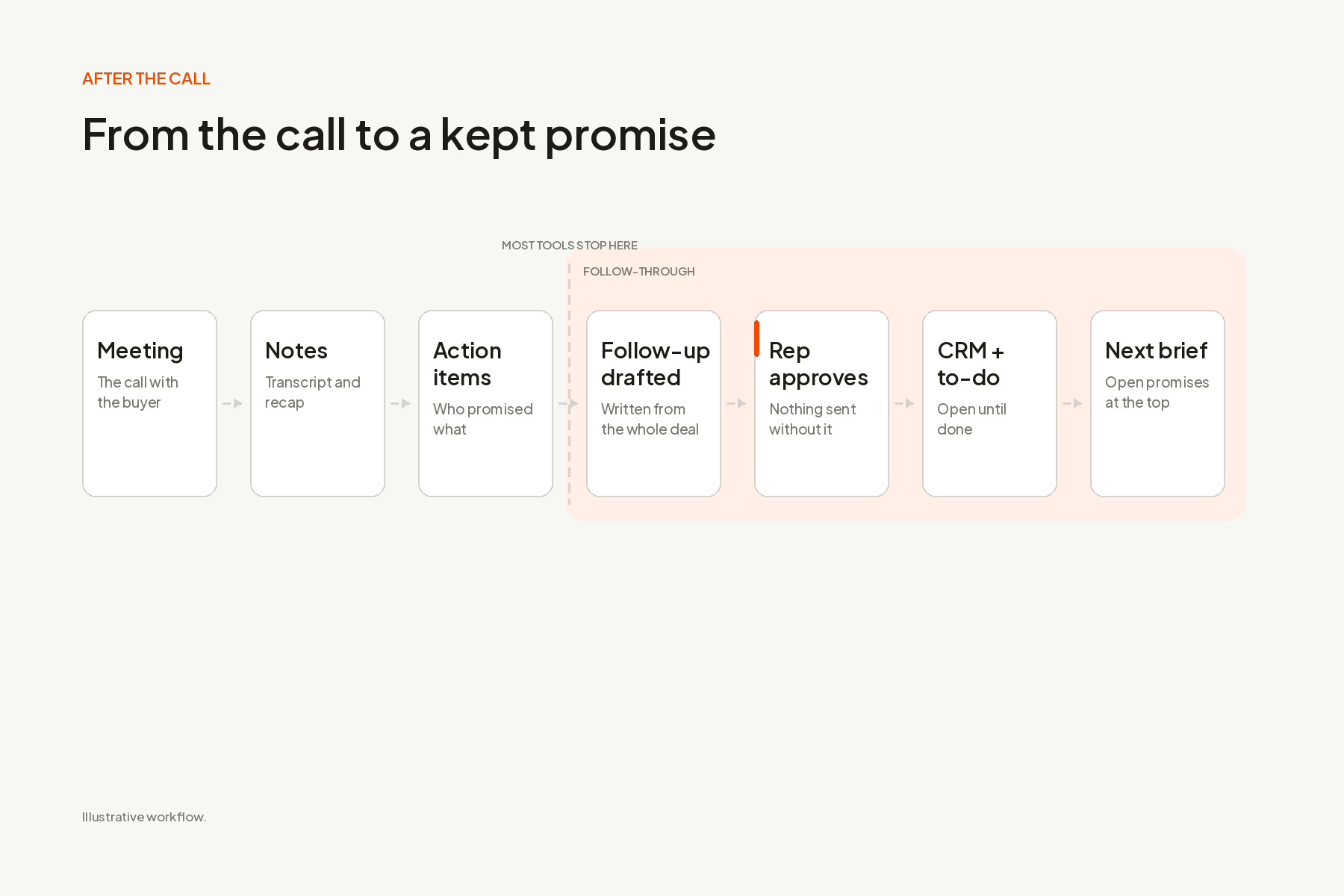
- After the call: the recap, a follow-up email in your voice, the CRM update and next-step to-dos with owners and due dates are ready for review. Nothing is sent or written to your CRM until the rep approves it.
- Until it’s done: reps check off, snooze or reprioritize to-dos across every account in one list, with reminders. Sales leaders get a short digest that flags deals at risk and broken promises.
Another tool may fit better if your CRM is not Salesforce or HubSpot.
Bring us one recent call from an open deal. See the follow-up AnyTeam would draft and the commitments it would track.
The best AI meeting follow-up tools for sales teams, by job
| If you want… | Start with | Why |
|---|---|---|
| Follow-up drafted from the whole deal, approved before anything is sent, and tracked to done | AnyTeam | One account memory across meetings, email, CRM, Slack and documents; every send and CRM write waits for approval |
| Action items in Salesforce or HubSpot plus a task list for each deal | Fireflies | Salesforce Tasks, HubSpot tasks and Deal Intelligence on Business |
| A widely used notetaker that can create CRM tasks | Fathom | Salesforce and HubSpot tasks; Deal View on Business |
| Action items carried forward until they’re done | Fellow | Due dates, Past Due status and carry-forward across a meeting series |
| Tasks plus CRM field updates for revenue teams | Avoma | HubSpot tasks, mapped CRM field updates, Slack alerts |
| Creating each CRM task by hand from a review dialog | Read AI | One-click Salesforce or HubSpot task per action item |
| MEDDPICC and deal fields filled in, with low-confidence updates held for review | Sybill | CRM autofill and a review queue |
| Salesforce fields updated from calls, confirmed in Slack first | Momentum | “Confirm to Write” review option |
| Follow-up inside a conversation intelligence platform | Gong | Follow-up drafts, to-dos and AI field extraction |
| Follow-up inside HubSpot | HubSpot Sales Hub | Notetaker, suggested tasks and property updates with per-property review |
AnyTeam publishes this page and lists itself first, for the job it was built for. The others are ordered by the job they fit, not by a score.
What’s the difference between an action item and a follow-up?
An action item is a line in the notes. A follow-up is work with an owner, a date and a buyer waiting on it. A notetaker can list what was promised, but it can’t make sure the promise is kept. In 2026 almost every meeting tool extracts action items and drafts a recap email, so comparing tools on that alone misses where they differ. The hard part is the work after the call: in Salesforce’s State of Sales report, 2026 edition, sales professionals said 13% of their week already goes to manual data entry (4,050 respondents, August to September 2025), and the small promises are what slip first.
For a sales team, follow-through needs six things:
- Capture who promised what, on both sides. “We’ll send the security one-pager” and “Dana will introduce us to IT” are both commitments, and the second one is easy to lose.
- Turn each one into a single next action with one owner and one date. If it doesn’t say what happens next, it’s still a note.
- Draft the follow-up from the deal, not just the call. The email should reflect who joined, what changed and what is still open.
- Write to the CRM after someone checks it. Wrong or padded tasks cost your team the trust it has in the CRM.
- Keep it open until it’s done. Reminders and a clear status, not a list that disappears after the call.
- Carry it into the next meeting on the account. A promise from meeting two should be in the meeting four brief.
Why should follow-up be grounded in the deal, not just the call?
Because the right next step depends on what happened before this call. A tool that reads one meeting writes a recap. A tool that reads the account writes the follow-up your best rep would send.
Take a fourth meeting with Halvorsen Freight, a fictional freight carrier. The buyer, Dana, asks whether single sign-on is included.
- A follow-up written from this call alone thanks Dana, answers the SSO question and lists the next steps from today.
- A follow-up written from the deal also knows that Priya, the CFO, joined for the first time, that the security one-pager promised in meeting three has been sent, that Dana’s introduction to IT is still pending, and that Dana said their last rollout failed because IT joined too late. So it answers SSO, gives Priya the pilot scope she came for, and asks for the IT introduction with a date, because that is the commitment most likely to stall the deal.
Only the second one moves the deal.
One commitment, followed from meeting to done
Here is what complete follow-through looks like for one promise on one deal. This is an illustrative example with a fictional company and people.
| Step | What happens | Where most tools stop |
|---|---|---|
| Meeting 3 | The rep promises the security one-pager by Friday. Dana promises an intro to Marcus in IT. | Both appear in the action items |
| End of call | Two to-dos are created: the one-pager (owner: rep, due Friday) and a check-in on the IT intro (owner: rep, due next Wednesday). The follow-up email is drafted with both. | Many tools draft the email; few tie it to the deal |
| Rep review | The rep edits one line and approves the email and the CRM update. | Some tools write to the CRM automatically |
| CRM | Next steps and both commitments are logged on the Halvorsen Freight record. | Some tools log a summary only |
| Friday | The one-pager is sent and checked off. | Tracking often ends at the CRM task |
| Next Wednesday | The IT intro hasn’t happened. A reminder fires and the item stays open. | Per-meeting tools don’t know it’s still open |
| Meeting 4 brief | “Dana’s intro to IT still pending” is at the top, next to her comment about the last rollout. The sales leader’s digest flags it as a promise at risk. | Gong and Sybill briefs list open action items; per-meeting notetakers don’t, and none documents a leader digest of broken promises |
What gets written to your CRM, and who checks it?
Ask every vendor this before you buy. Some tools write to Salesforce or HubSpot as soon as the call ends. Others hold every change for a person to approve. Here is what each vendor’s documentation says:
| Tool | Writes automatically | Waits for review |
|---|---|---|
| AnyTeam | Drafts the recap, follow-up, CRM update and to-dos | Every email send, CRM write and Slack post |
| Fathom | Salesforce sync by default when the meeting ends | Manual “Sync to CRM” option; HubSpot tasks created by the rep |
| Fireflies | Action items to CRM tasks once enabled | No review step documented |
| Fellow | Notes and action items to HubSpot or Salesforce 3 hours after the meeting, if automatic sending is on | AI-suggested items must be accepted before they sync to project tools |
| Avoma | Fields an admin has mapped | Tasks created by the rep; no review step documented for fields |
| Read AI | Nothing | Each task created by the rep from a dialog |
| Sybill | Confident field updates | Low-confidence updates go to a review queue |
| Momentum | Configurable | “Confirm to Write” shows extractions for review in Slack or the web app |
| Gong | AI Data Extractor updates fields once an admin publishes it | No rep step documented |
| HubSpot | Properties set to auto-approve | Properties set to require review; tasks created by the rep |
Why it matters: your forecast is only as good as your CRM. A tool that pulls ten “action items” from a 30-minute call and writes all of them fills the record with noise, and reps stop trusting it. Review before writing costs a rep a few seconds and protects the data your leaders use.
The 10 tools in detail
1. AnyTeam: best for follow-up drafted from the whole deal and tracked to done
- Follow-up: after each call, AnyTeam prepares the recap, a follow-up email in your voice, the CRM update and next-step to-dos with owners and due dates, using the account’s shared memory of earlier meetings, Gmail or Outlook, Salesforce or HubSpot, Slack and documents.
- Commitments: speaker detection means it knows who said what, so buyer promises are captured alongside your own. Open items appear in the next meeting’s brief.
- Tracking: to-dos from every account live in one list where reps check off, snooze or reprioritize, with in-app and desktop reminders. Leaders get a prioritized digest of deals at risk and broken promises for the reps assigned to them.
- Control: nothing outbound goes out without approval, including emails, CRM writes and Slack posts. High-stakes actions pass an independent check, and every action is written to a tamper-evident audit trail.
- Limits: meetings must be captured by AnyTeam to be in memory; Salesforce and HubSpot only; pricing not published.
- See it: How AnyTeam Handles Your Post-Call Busywork · Never Lose a Thread, a Promise, or a Deal Again
2. Fireflies: best for CRM tasks plus a per-deal task list
Once task creation is turned on, sends action items to Salesforce Tasks and HubSpot tasks, plus project tools such as Asana, Jira, ClickUp, Monday, Linear and Trello, and can draft follow-up emails. Deal Intelligence (Business, $19 per seat per month billed annually, $29 monthly) adds a Tasks tab per deal with Pending, In Progress and Done. No review step or reminders documented. Records calls. Sources: Salesforce, HubSpot tasks, project tools, follow-up emails, Deal Intelligence, pricing.
3. Fathom: best for CRM tasks from a widely used notetaker
Finds action items with assignees and writes a follow-up email to copy. Creates Salesforce tasks automatically once Create Tasks is on, and reps create HubSpot tasks one action item at a time; it can also send your own action items to your Asana account. Salesforce sync runs when the meeting ends unless set to manual. Deal View, for asking about next steps across a deal’s calls, is on Business ($25 per user per month billed annually, $34 monthly). Records video. Sources: action items and follow-up, Salesforce, Asana, HubSpot, Deal View, pricing.
4. Fellow: best for carrying action items forward until they’re done
Among the meeting tools here, Fellow documents the most complete tracking: due dates, Past Due status and carry-forward to the next meeting in a series (grouped by series, not by deal). Creates HubSpot tasks and a Salesforce note or task, syncs two ways with Asana (and with Jira once enabled), and drafts follow-ups. CRM sync waits three hours after the meeting so reps can edit, and AI-suggested items must be accepted before they reach project tools. CRM integrations on Business ($15 per user per month billed annually, $23 monthly). Records calls. Sources: action items, carry-forward, Asana, Jira, HubSpot, Salesforce, pricing.
5. Avoma: best for tasks plus CRM field updates
Drafts follow-ups from the summary, decisions and next steps. Reps create tasks in HubSpot or ClickUp from an action item (Salesforce tasks appear only on its marketing page). Writes to the CRM fields an admin maps, such as next steps, after each meeting; the product page adds overdue flags and manager reporting. From $19 per seat per month billed annually ($29 monthly); two-way field updates need a Revenue Intelligence add-on. Records calls. Sources: action item tracking, after the meeting, field mapping, pricing.
6. Read AI: best for creating each CRM task by hand
Reps create each Salesforce, HubSpot or Asana task from a detected action item through a review dialog, and Read AI drafts follow-up emails per contact. CRM integrations on Pro ($15 per user per month billed annually, $19.75 monthly); video recording on Enterprise only. Sources: Salesforce tasks, HubSpot tasks, pricing.
7. Sybill: best for filling deal fields with a review queue
Writes a follow-up email for each call and pushes summaries to the CRM on Pro (from $30 per user per month). CRM Autofill on Business ($90) fills fields such as MEDDPICC and next steps, holding low-confidence updates for review. AI Tasks track deal tasks inside Sybill; native CRM tasks aren’t documented. Records calls. Sources: HubSpot, CRM autofill, pricing.
8. Momentum: best for Salesforce updates confirmed in Slack
Lists next steps and commitments, suggests follow-up emails, writes a note on the Salesforce opportunity and fills opportunity fields. “Confirm to Write” shows each extraction in Slack or the web app before saving. Tracking to completion isn’t documented. Recording is a paid Conversation Intelligence add-on; pricing not published. Sources: call summaries, Confirm to Write, add-on.
9. Gong: best for follow-up inside a conversation intelligence platform
Drafts follow-up emails on any plan; sending from Gong and to-dos (which can be assigned to a teammate and expire after 7 days) need Engage. The AI Data Extractor (Gong Foundation) updates CRM fields once an admin publishes it, with no rep step. CRM tasks aren’t documented. Records calls; pricing not published. Sources: follow-up email, to-dos, AI Data Extractor.
10. HubSpot Sales Hub: best for teams that run follow-up inside HubSpot
The meeting notetaker suggests action items and a follow-up email to review; reps create each task, and native tasks have due dates and email reminders. Suggested property updates can auto-approve or require review per property (call and meeting outcomes auto-approve by default). Help docs place the notetaker on Sales Hub Professional (from $90 per seat per month billed annually) and Enterprise with an assigned seat; the pricing table doesn’t list it, so confirm. Records calls. Sources: notetaker, tasks, pricing.
Also worth a look: Otter detects commitments, suggests next steps and pushes action items into Salesforce or HubSpot records automatically. Granola lets you approve before anything leaves it and sends commitments to HubSpot inside the meeting record, not as tasks. Salesforce Einstein Conversation Insights surfaces next steps from recorded calls inside Salesforce.
Is meeting follow-up the same as automated email follow-up?
No. Meeting follow-up acts on what was said in a conversation. Automated email follow-up sends a planned sequence to people who haven’t replied. Sequencers such as Outreach, Salesloft and Apollo run prospecting cadences that stop when someone responds. Meeting follow-up tools start from a call that already happened. If deals stall because cold leads never hear back, look at a sequencer; if they stall because a promise from a live call was forgotten, you need meeting follow-up. AnyTeam is not a sequencer.
How to choose and test a meeting follow-up tool
Choose by where your follow-up breaks today. If reps simply don’t write recaps, almost any tool here helps. If commitments get lost between meetings, or your CRM is full of noise, ask every vendor five questions:
- What exactly do you write to my CRM: a summary, fields or tasks?
- Who approves it before it’s written, and can I require approval?
- Is task creation on or off by default?
- Do you capture what the buyer promised, or only my rep’s next steps?
- Can I see open commitments across a whole deal, and across my team?
Then run a one-week test on five real calls from deals with at least three meetings. A good tool creates only the real commitments, gets none of them wrong, writes nothing to the CRM you didn’t approve, and puts a promise from an earlier meeting in front of the rep before the next call.
Free sales follow-up tracker template
Use one line per commitment. Copy it into your CRM task, a sheet or your follow-up tool.
For every commitment: what was promised · who promised it (your side or the buyer) · owner on your team · due date · the account and meeting it came from · status (open, done, at risk).
After every call: send the recap the same day · one next action per commitment · check every buyer promise has an owner on your side who follows it up.
Before every meeting: list everything still open on the account, oldest first · raise any buyer promise that is past due · close what’s done in the CRM.
Frequently asked questions
What is the best sales action item tracking software for B2B sales teams?
For multi-meeting deals where promises get lost between calls, AnyTeam drafts follow-up from the account’s history, waits for approval before writing anything, and tracks to-dos until they’re done. Fireflies adds a per-deal task list, Fellow tracks items across a meeting series, and HubSpot suits teams that live in HubSpot.
What sales action item tracking software works best with Salesforce?
Fathom and Fireflies create Salesforce tasks from action items, Read AI creates them one at a time, and Fellow sends a Salesforce note or task. Sybill, Momentum and Gong update Salesforce fields. AnyTeam logs next steps and commitments to Salesforce after the rep approves. Check whether the tool writes automatically or waits for review.
What is the best sales action item tracking software for account executives with back-to-back meetings?
Pick a tool that has the follow-up ready before your next call starts. Every tool here drafts follow-up emails; AnyTeam also prepares the CRM update and to-dos at the same time for one review.
Which sales action item tracking software makes sure next steps from sales calls actually get done?
Few tools track a next step to completion. Fellow documents due dates, a Past Due state and carry-forward between meetings in a series. Fireflies tracks task status per deal on its Business plan. AnyTeam keeps to-dos open with reminders until they’re checked off and puts unfinished items, including buyer promises, in the next meeting’s brief.
Which sales action item tracking software lets managers see open customer commitments across the team?
Most tools don’t document a dedicated view. Fellow has an Assigned to others tab, Fireflies shows tasks per deal, and Gong shows to-dos on account and deal pages. AnyTeam gives sales leaders a prioritized digest of deals at risk and broken promises for the reps assigned to them.
How can I automate follow-up tasks in my CRM?
CRM workflows create tasks from triggers, such as a deal changing stage. To create them from what was said in a meeting, connect a meeting tool to Salesforce or HubSpot and require approval for anything that reaches the buyer or changes a deal record.
How we compared and publisher disclosure
Every vendor fact comes from first-party product pages, help centers and pricing pages checked on October 19, 2026. We compared how each tool drafts follow-up, writes to Salesforce or HubSpot, asks for review, tracks items to done and shows open items across a deal or team. “Not documented” means we found no first-party source, not that it’s impossible. Vendor time-saved claims are not repeated. The Halvorsen Freight example is fictional.
AnyTeam publishes this page and is one of the tools compared. It is held to the same fields as every other tool, including what it doesn’t do: sequence outbound email, support CRMs beyond Salesforce and HubSpot, or publish pricing. Send corrections with first-party documentation through our contact page.